
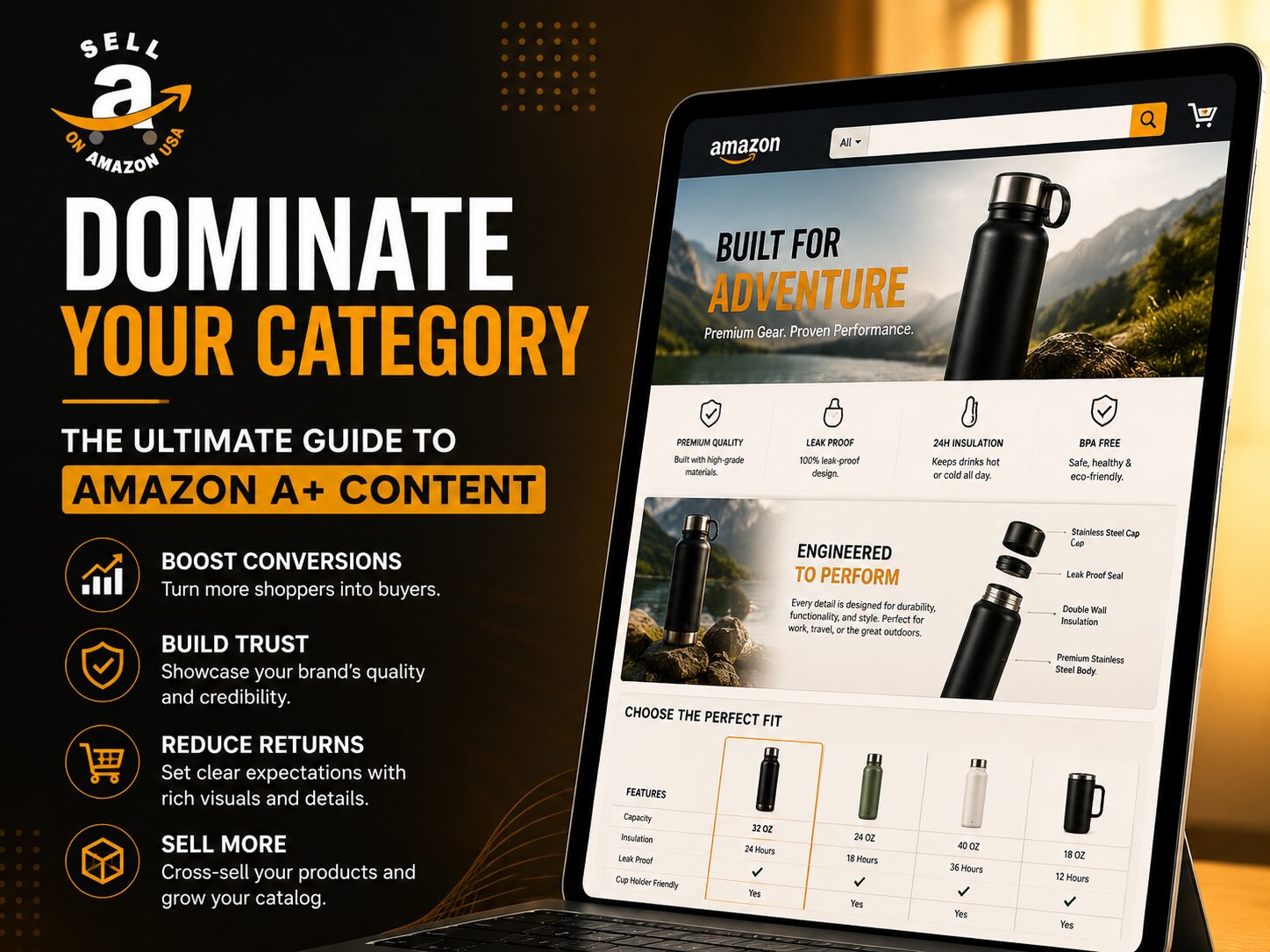
In the hyper-competitive marketplace of 2026, driving traffic to your listing is only half the battle. If your detail page looks like a digital textbook from 2012, your conversion rates will plummet, your Advertising Cost of Sales (ACoS) will skyrocket, and your organic ranking will inevitably decay.
The modern consumer does not read; they skim, scroll, and visually consume information. To capture their attention and justify your price point, you must transform your standard product listing into an immersive digital storefront. You need Amazon A+ content.
Whether you are launching your first private label product or managing a catalog of hundreds of SKUs, mastering this visual merchandising tool is no longer optional—it is a baseline requirement for survival. Here is your definitive guide to leveraging A+ Content to scale your brand, crush your competitors, and maximize your profitability.
What Exactly is Amazon A+ Content?
Formerly known as Enhanced Brand Content (EBC), Amazon A+ content is a premium feature available exclusively to sellers enrolled in the Amazon Brand Registry.
It allows brand owners to replace the standard, text-only product description section with rich, customizable multimedia modules. Instead of a boring block of text, you can utilize high-definition lifestyle imagery, custom brand storytelling, bold typography, and interactive comparison charts.
Think of it as bringing the premium, high-converting aesthetic of a direct-to-consumer (DTC) Shopify website directly onto the Amazon marketplace.
The Eligibility Barrier
To access this tool, you must have a registered trademark and be successfully enrolled in Amazon Brand Registry. Once enrolled, the A+ Content manager becomes completely free to use across all your registered ASINs.
The Tangible ROI: Why You Cannot Afford to Ignore It
Investing time and capital into graphic design for your product listings might seem like a secondary priority, but the financial metrics tell a very different story. Implementing high-quality A+ Content directly impacts your bottom line in three distinct ways:
1. Massive Conversion Rate Lifts
According to Amazon’s own internal data, adding standard A+ Content to a product listing can increase conversion rates by 3% to 10%. In competitive niches, a 5% bump in conversion rate can be the difference between ranking on Page One and disappearing into obscurity. When your conversion rate increases, the A9 algorithm rewards you with cheaper PPC clicks and higher organic visibility.
2. Drastic Reduction in Return Rates
One of the most silent killers of an Amazon business is a high return rate. Returns destroy your profit margins and trigger algorithmic penalties. A+ Content allows you to visually explain complex product features, demonstrate exact sizing, and set realistic customer expectations. When a shopper fully understands what they are buying through clear infographics, they are far less likely to return the item.
3. Cross-Selling and Catalog Expansion
The “Comparison Chart” module is arguably the most powerful tool within the A+ ecosystem. It allows you to feature up to six other products from your own catalog, directly on the detail page, complete with clickable links. If a shopper decides the current product isn’t exactly what they need, they can seamlessly click over to a different variation or an upgraded model within your brand, rather than bouncing to a competitor’s page.
The Anatomy of a High-Converting Layout
You cannot simply throw a few random pictures onto the page and expect your sales to double. A high-converting Amazon A+ content page requires a deliberate, psychological layout. Here is the blueprint our experts at Sell On Amazon use to architect dominant listings:
1. The Hero Banner (The Hook)
The very first module should be a massive, visually stunning lifestyle image featuring your product in action. Do not clutter this space with text. The goal is to immediately validate the shopper’s click and evoke an emotional response. If you sell camping gear, show your tent glowing under a starry night sky.
2. The Value Proposition (The Solution)
Follow the hero banner with a module that breaks down your core value propositions. Use the “Standard 3 Images and Text” module to highlight the three biggest problems your product solves. Use iconography and short, punchy sentences. Remember, shoppers are skimming.
3. The “Deep Dive” Infographic
Use a large image module to break down the technical specifications. If you are selling a supplement, use this space to visually highlight the organic ingredients. If you are selling electronics, use call-out lines to point to specific hardware features.
4. The Brand Story
Modern consumers want to buy from brands they align with. Use a text and image module to briefly explain who you are, why you created the product, and your commitment to quality. Humanizing your brand builds immense loyalty and repeat purchases.
5. The Comparison Matrix (The Closer)
Always close your A+ Content with a comparison chart. Cross-sell your complementary products (e.g., selling your beard oil alongside your beard wash and comb). This creates a closed-loop ecosystem that keeps buyers firmly trapped within your brand halo.
The SEO Myth: Does A+ Content Index?
There is a massive amount of confusion regarding Search Engine Optimization (SEO) and A+ Content. Let’s clear the air for 2026:
- Amazon Indexing: The actual text you type into the A+ Content modules is not indexed by Amazon’s A9 search algorithm. To ensure you rank on Amazon, your backend search terms, title, and bullet points must remain perfectly optimized.
- Google Indexing: The text within your A+ Content is indexed by Google. Therefore, writing high-quality, keyword-rich copy in your A+ modules is highly beneficial for driving external off-Amazon traffic to your listing.
- Alt-Text is Critical: When you upload images to your A+ manager, Amazon requires you to enter “Image Keywords” (Alt-Text). Amazon does index this Alt-Text. You must load these image tags with highly relevant, long-tail keywords that did not naturally fit into your main bullet points.
The Mobile-First Mandate
Over 60% of all Amazon purchases are now made on a mobile device. If your A+ Content looks beautiful on a 27-inch desktop monitor but requires the user to squint to read the text on an iPhone, you are actively losing money.
When designing your modules, you must adopt a mobile-first mindset:
- Keep text inside images as large and bold as possible.
- Use high-contrast colors so graphics pop on low-brightness phone screens.
- Always utilize the “Mobile Preview” toggle in Seller Central before submitting your design for approval. If the text wraps awkwardly or the images become microscopic, redesign the module.
Common Mistakes That Ruin Conversion Rates
Even experienced sellers make critical errors when building out their visual assets. Avoid these fatal mistakes:
- Text-Heavy Graphics: Do not upload images containing paragraphs of text. It looks incredibly messy, violates Amazon’s TOS regarding text-to-image ratios, and is entirely unreadable on mobile devices.
- Inconsistent Branding: If your product packaging features modern, minimalist fonts, but your A+ Content uses cartoonish fonts and clashing colors, you will destroy consumer trust. Brand cohesion is mandatory.
- Ignoring the Brand Story Module: The “Brand Story” is a separate feature that sits above your regular A+ Content. It is a scrolling carousel that links to your Amazon Storefront. Leaving this blank is leaving free ad space on the table.
Conclusion: Stop Selling, Start Branding
The era of slapping a private label logo onto a generic product and dominating a category is over. Amazon is actively rewarding sellers who invest in brand equity, visual merchandising, and customer education.
By executing a flawless Amazon A+ content strategy, you elevate your product from a mere commodity into a premium brand. You answer customer questions before they are asked, justify a higher price point, and build a protective moat around your market share.
Designing, writing, and optimizing these assets requires significant time and specialized expertise. If your current listings are underperforming, it is time to bring in the heavy artillery.
Ready to transform your generic product pages into high-converting digital showrooms? The experts at Sell On Amazon specialize in comprehensive catalog optimization, stunning visual design, and aggressive brand management. Let us architect the visual assets you need to scale your revenue and crush your competition.
Frequently Asked Questions (FAQs)
Q: How much does it cost to add Amazon A+ Content to my listings?
The tool itself is completely free within Seller Central, provided you are enrolled in Amazon Brand Registry. The only costs associated with it are the expenses you incur to hire graphic designers, copywriters, or agencies to create the visual assets.
Q: How long does it take for Amazon to approve my A+ Content?
Typically, the review process takes anywhere from 24 hours to 7 days. During Q4 (the holiday rush), approval times can occasionally stretch longer. Ensure your content adheres strictly to Amazon’s guidelines (no promotional pricing text, no off-platform URLs, no medical claims) to avoid rejection and delays.
Q: Can I use A+ Content if I am a wholesale seller or an arbitrage seller?
No. A+ Content is strictly reserved for the intellectual property owners of the brand. You must have a registered trademark and successfully complete the Brand Registry process to unlock and manage the content on a specific ASIN.
Q: If I add A+ Content, does my old text product description disappear?
Yes and no. Visually, on the desktop and mobile app, the A+ modules will completely replace the old text description. However, you should still keep your old HTML text description populated in the backend of Seller Central, as Amazon sometimes still pulls keyword data from that hidden field for indexing purposes.
Q: What is the maximum image size I can upload?
The dimensions depend entirely on the specific module you select. For standard A+ Content, the most common large banner module requires an image exactly 970 pixels wide by 600 pixels tall. Amazon will force you to crop images that do not fit these exact dimensions, so it is crucial to design your assets to the correct specifications beforehand.